In this blog post .NET 11 Worktrees and Cleaner Developer Workflows for Enterprise Teams we will look at a simple idea that can make modern software delivery cleaner, safer, and less frustrating.
One pattern I keep running into is that developer productivity problems are rarely caused by one big issue. More often, they come from small frictions repeated every day: switching branches, rebuilding dependencies, breaking a local environment, waiting for tests, or trying to review AI-generated changes without polluting the main workspace.
Worktrees help with that. They let a developer keep multiple working copies of the same Git repository on the same machine, each on a different branch, without cloning the entire repository again.
For technology leaders, the important point is not the Git command. The important point is workflow isolation. In a world where .NET 11, cloud-native applications, AI coding assistants, and security scanning are all moving quickly, clean isolation is becoming a leadership concern, not just a developer preference.
The high-level idea
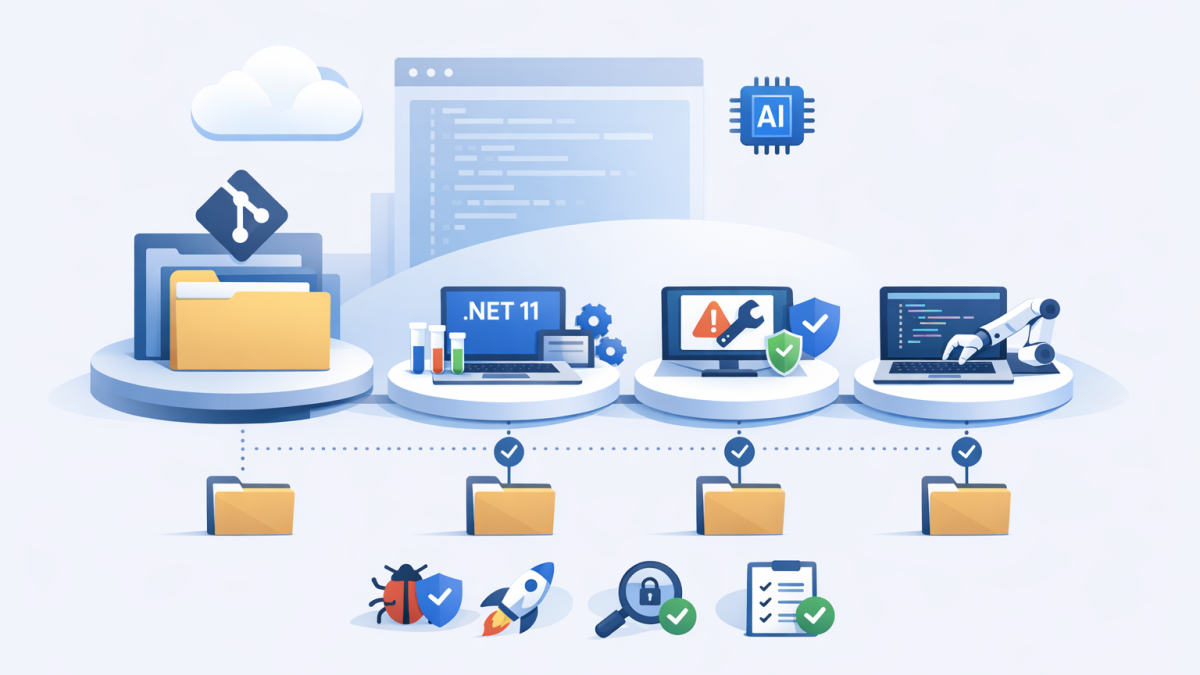
A Git worktree is a separate folder connected to the same repository history. One folder might be running the current production hotfix. Another might be testing a .NET 11 preview migration. A third might be used by an AI agent to explore a refactoring idea.
Each folder has its own checked-out files and branch. But underneath, Git shares the repository data, so it is lighter than maintaining multiple full clones.
That sounds small, but in enterprise environments it changes behaviour. Developers stop constantly stashing work. Release branches become easier to inspect. Proof-of-concepts stop contaminating normal development. AI-generated code can be reviewed in a controlled space before it touches anything important.
Why this matters more with .NET 11
.NET 11 is currently in preview, with the final release expected in November 2026. Like recent .NET releases, it continues the direction Microsoft has been taking for several years: better performance, smaller SDK improvements, stronger diagnostics, more cloud-native support, and smoother developer experience.
In my experience as a solution architect and enterprise architect, preview adoption is where many teams either build confidence or create avoidable risk. The mistake is not testing previews. The mistake is testing them inside the same messy workspace developers use for active delivery.
A cleaner pattern is to create a dedicated worktree for .NET 11 evaluation. That worktree can have its own branch, SDK configuration, build output, test results, and migration notes.
The main delivery branch remains stable. The experiment remains visible. The team can compare outcomes without mixing unrelated changes.
The technology behind worktrees
At a technical level, Git normally gives you one working directory for one repository. When you change branches, Git updates the files in that directory to match the selected branch.
That model is fine for simple projects. It becomes awkward when teams support multiple release lines, urgent defects, long-running features, and platform upgrades at the same time.
Worktrees extend that model. Git keeps one main repository but allows extra working directories linked to it. Each linked worktree has its own branch checkout, index, and working files.
A simple example looks like this:
git worktree add ../orders-hotfix hotfix/orders-api

git worktree add ../orders-net11-preview -b spike/net11-preview main

cd ../orders-net11-preview

dotnet --list-sdks

dotnet build
In plain English, this creates one folder for a hotfix and another folder for a .NET 11 preview spike. The developer can move between them without stashing, resetting, or cloning the repository again.
For a .NET team, I often like pairing this with a local SDK pin using global.json. That makes the experiment repeatable.
{
 "sdk": {
 "version": "11.0.100-preview.5",
 "rollForward": "latestFeature"
 }
}
The exact SDK version will change as previews move forward. The principle is what matters: make the environment explicit, not assumed.
The business problem is context switching
Most executives understand context switching at the human level. It is the cost of stopping one piece of work, loading another into your head, and then trying to return to the original task without losing quality.
Developers experience the same thing, but with code, dependencies, test data, configuration, containers, ports, secrets, and local databases.
I have seen teams lose hours because a developer had to pause a feature, switch to a hotfix, rebuild everything, fix a local configuration issue, then return to the feature and discover their previous state was no longer clean.
Worktrees do not solve every delivery problem. But they remove one unnecessary source of friction.
That has a business outcome. Less friction means faster response to production issues, safer experimentation, and fewer accidental changes creeping into pull requests.
Where AI changes the workflow
The biggest change I see coming is not simply .NET 11. It is .NET 11 plus AI-assisted development.
Tools built around OpenAI, Claude, GitHub Copilot, and other coding assistants are becoming more capable. They can generate tests, refactor code, explain stack traces, and suggest migration steps.
But AI-generated changes need containment. An assistant that touches the same working directory as a developer can create confusion very quickly.
That is where worktrees become more than a convenience. They provide a safe sandbox for parallel work.
One developer can continue on the main feature branch. An AI assistant can explore a refactoring in a separate worktree. A third worktree can run a .NET 11 compatibility spike.
The team then reviews the result through normal engineering controls: pull requests, test results, code owners, security checks, and architecture review where needed.
How I would position this for enterprise teams
For CIOs and CTOs, I would avoid presenting worktrees as a technical trick. Present them as a workflow control.
In enterprise IT, clean workflow matters because the blast radius of poor change management is high. A small mistake in a shared library, identity integration, payment workflow, or customer-facing API can become expensive very quickly.
Worktrees help teams separate different types of work:
- Production support stays isolated from feature development.
- Platform upgrades such as .NET 11 testing happen in a dedicated space.
- AI-assisted experiments are reviewed before merging.
- Security remediation can be handled without disrupting active sprint work.
- Release comparison becomes easier when two branches can run side by side.
This is especially useful in larger Microsoft environments where Azure, Microsoft 365 integrations, identity, APIs, and background services all interact. The more connected the system, the more valuable clean isolation becomes.
The Australian security angle
Working from Melbourne with organisations across Australia and internationally, I often think about developer workflow through a security lens as well as a productivity lens.
The ACSC Essential Eight encourages disciplined patching, controlled administrative access, application control, and regular vulnerability management. Those controls are often discussed at the infrastructure level, but they also depend on good software delivery habits.
A cleaner developer workflow makes it easier to test dependency updates, validate SDK changes, and run security scans without delaying normal delivery.
For example, a team can create a worktree purely for package remediation:
git worktree add ../orders-security -b fix/dependency-remediation main

cd ../orders-security

dotnet list package --vulnerable

dotnet test
That does not replace governance. It supports governance by making the right behaviour easier.
Practical adoption steps
I would not roll this out with a large process document. Start small and make the pattern visible.
- Pick one team that already deals with hotfixes, feature branches, and platform upgrades.
- Standardise folder naming so worktrees are easy to understand, such as
../app-hotfixor../app-net11. - Use global.json for SDK experiments so the .NET version is explicit.
- Keep secrets out of worktrees and rely on managed identity, local secret stores, or approved developer secret handling.
- Add cleanup habits so abandoned worktrees do not become clutter.
- Connect it to pull request discipline so every experiment still passes through review and automated checks.
The point is not to make every developer use worktrees for every task. The point is to use them where they reduce risk and cognitive load.
What leaders should ask
If I were reviewing a .NET platform roadmap in 2026, I would ask a few simple questions.
- How are we testing .NET 11 without disrupting current delivery?
- Can developers work on urgent fixes without stashing unfinished feature work?
- Where do AI-generated changes happen before human review?
- Can we run security remediation in parallel with planned delivery?
- Are our local development environments repeatable enough to trust?
These are not purely engineering questions. They are questions about delivery resilience.
A cleaner future for developer workflows
After more than 20 years in enterprise IT, I have learned that better architecture is not only about cloud platforms, frameworks, or reference diagrams. It is also about the daily habits that shape how teams make change.
.NET 11 will bring useful improvements, and the broader .NET ecosystem continues to mature. But the teams that benefit most will be the ones that pair new platform capability with cleaner ways of working.
Worktrees are a small tool with a large behavioural impact. They create space for parallel work, safer AI experimentation, cleaner upgrades, and less context switching.
The future of developer productivity may not be one giant breakthrough. It may be a series of practical improvements that make good engineering easier to repeat.
That is the part I find most interesting: as AI accelerates code creation, the real differentiator may become how well organisations isolate, review, govern, and trust the work before it reaches production.
